

- 01000502545
-
This email address is being protected from spambots. You need JavaScript enabled to view it.
QNAP NAS TS-233
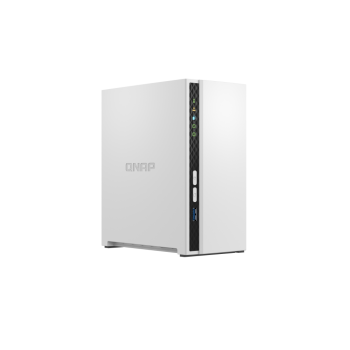
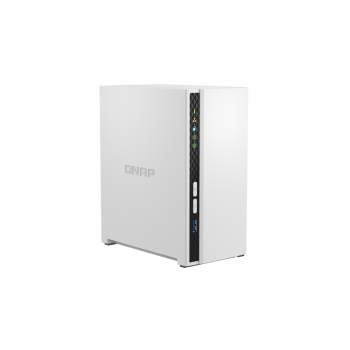
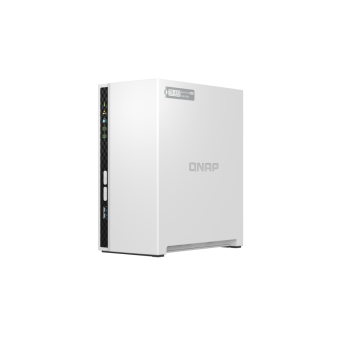
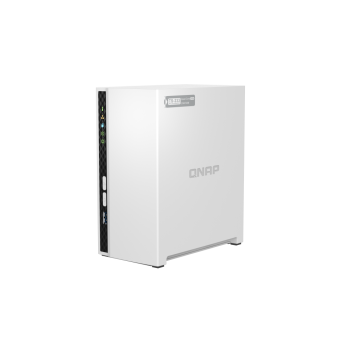
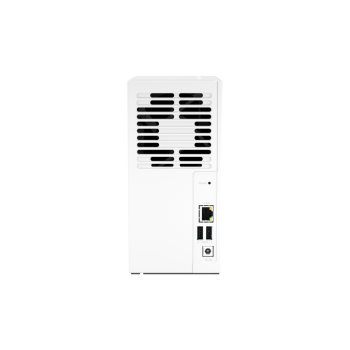
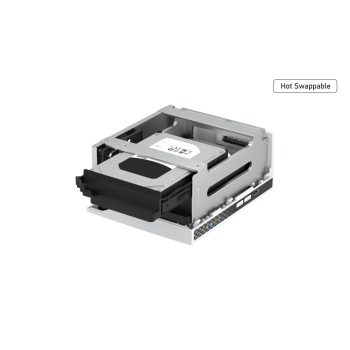
QNAP TS-233
Run your own personal cloud storage and enjoy easy file access, sharing, and syncing with the QNAP TS-233. Designed for beginners and home NAS users, the TS-233 simplifies data storage and collaboration, and also features rich multimedia applications as a complete home entertainment portal.

Key Highlights
Centralized multimedia management
Centrally store photos, music, and videos; easily browse, organize, and share multimedia files.
AI-powered image recognition
With a built-in NPU (Neural network Processing Unit), the TS-233 boosts performance for high-speed face and object recognition.
Home entertainment center
Supports ARM NEON technology that accelerates video processing for a greater entertainment experience.
Secure remote access
myQNAPcloud allows you to easily access, manage, and share NAS files via the Internet.
Snapshot protection against ransomware
Protect your files and data from accidental deletion and malware attacks using advanced snapshot protection.
Comprehensive security management
Serves as a secure private cloud and supports user account protection, IP blocking, 2-step verification, encryption access, and more.
Minimalist design
The compact and slim TS-233 prioritizes a clean and essential design, and perfectly blends into your home or office. The design extends to the hard drives, which can be installed without needing a screwdriver.
Effective cooling for better airflow
The TS-233 is small in size and remains high-performance, cool, and quiet with an effective cooling fan.
64-bit quad-core performance for everyday use
Powered by a 64-bit ARM Cortex-A55 quad-core 2.0 GHz processor with 2 GB RAM, the TS-233 delivers dependable performance for home and small office NAS applications, and supports AES-NI 256 hardware-accelerated encryption to help secure sensitive data.
NPU accelerates on-device AI performance
NPU (Neural-network Processing Unit) is designed to speed up AI tasks, accelerating organization and classification in QuMagie smart albums while reducing CPU workloads for optimized NAS performance.

QTS 5: Fast, smooth, and easy-to-use
The TS-233 comes with QTS 5, providing a next-generation usage experience with an updated system kernel, optimized user interface, and advanced security features.

An easy-to-use, all-in-one backup solution
The TS-233 is built around a complete backup solution to help protect your files and data. By regularly backing up your content, you can make data loss a thing of the past.

Back up Windows®/Mac® files
Use NetBak Replicator (Windows) or Time Machine® (macOS) to back up files to the NAS.

Back up mobile photos
Install Qfile or QuMagie mobile apps and enable auto-upload for effortless photo backup.

Back up Google Drive™
Hybrid Backup Sync helps safely back up data from Google Drive™ to your NAS.
Protect your data from ransomware with snapshots
Snapshots record the current state of the system and allow you to restore data to a previous point in time — helping mitigate ransomware threats and accidental changes.

| NAS | |
|---|---|
| CPU Model | ARM 4-core Cortex-A55 2.0GHz processor |
| CPU Architecture | 64-bit ARM |
| Hardware Encryption Engine | ✓ |
| Memory | 2 GB on board (non-expandable) |
| Drive Bays | 2 x 3.5-inch SATA 6Gb/s, 3Gb/s |
| Compatible Drive Type | 3.5-inch SATA hard disk drives 2.5-inch SATA solid state drives |
| Hot Swappable Drive | ✓ |
| RJ-45 1GbE LAN Port | 1 |
| USB 3.2 Gen 1 Port | 1 |
| Maximum Memory Capacity | 2 GB on board (non-expandable) |
| Form Factor (RU) | Tower |
| Graphic Processors | Mali-G52 |
| Floating Point Unit | ✓ |
| Hardware-accelerated Transcoding | ✓ |
| Flash Memory | 4 GB (Dual boot OS protection) |
| Wake on LAN (WOL) | ✓ |
| Jumbo Frame | ✓ |
| LED Indicators | System Status, LAN, USB, HDD1~2 |
| Buttons | Power, Reset, USB Copy |
| Power Consumption: Disk Standby Mode | 3.43 W |
| Power Consumption: Operating Mode, Typical | 10.81 W |
| Neural Processing Unit (NPU) | ✓ |
| USB 2.0 port | 2 |
| Operating System | QTS 5.2.6 |
There are no reviews for this product.

QNAP NAS TS-216G
Price: 19,600.00EGP
QNAP NAS TS-133
Price: 11,585.00EGP
QNAP NAS TS-433-4G
Price: 29,801.00EGP
QNAP NAS TS-364-8G
Price: 39,274.00EGP
QNAP NAS HS-264-8G
Price: 48,017.00EGP
QNAP NAS TBS-464-8G
Price: 47,289.00EGP
QNAP NAS TS-435XeU-4G
Price: 49,475.00EGP
QNAP NAS TS-264-8G
Price: 35,631.00EGP
QNAP NAS TS-464-8G
Price: 47,289.00EGP
QNAP NAS TS-664-8G
Price: 57,490.00EGP
QNAP NAS TS-h765eU-8G
Price: 64,776.00EGP
QNAP NAS TS-410E-8G
Price: 63,319.00EGP
QNAP NAS TS-932PX-4G
Price: 50,932.00EGP
QNAP NAS TS-832PX-4G
Price: 67,691.00EGP
QNAP NAS TS-473A-8G
Price: 60,404.00EGP
QNAP NAS TS-673A-8G
Price: 69,148.00EGP
QNAP NAS TS-873A
Price: 83,721.00EGP
QNAP NAS TVS-675-8G
Price: 83,721.00EGP
QNAP NAS TS-i410X-8G
Price: 85,178.00EGP
QNAP NAS TS-h973AX-32G
Price: 105,580.00EGP
QNAP NAS TS-432PXU-2G
Price: 52,389.00EGP
QNAP NAS TS-432PXU-RP-2G
Price: 72,791.00EGP
QNAP NAS TS-832PXU-4G
Price: 76,434.00EGP
QNAP NAS TS-832PXU-RP-4G
Price: 94,650.00EGP
QNAP NAS TS-1232PXU-RP
Call for Price:
QNAP NAS TS-464eU-8G
Price: 58,218.00EGP
QNAP NAS TS-864eU-8G
Price: 90,279.00EGP
QNAP NAS TS-864eU-RP-8G
Price: 120,153.00EGP
QNAP NAS TS-873AeU-4G
Price: 98,294.00EGP
QNAP NAS TS-873AeU-RP-4G
Price: 127,439.00EGP
QNAP NAS TS-464U-8G
Price: 80,078.00EGP
QNAP NAS TS-464U-RP-8G
Price: 98,294.00EGP
QNAP NAS TS-1264U-RP-8G
Price: 145,655.00EGP
QNAP NAS TS-855eU-8G
Price: 123,796.00EGP
QNAP NAS TS-855eU-RP-8G
Price: 152,942.00EGP
QNAP NAS TS-855X-8G
Price: 112,866.00EGP
QNAP NAS TS-1655-8G
Price: 145,655.00EGP
QNAP NAS TS-h1655XeU-RP-8G
Price: 211,233.00EGP
QNAP NAS TS-1273AU-RP-8G
Price: 171,158.00EGP
QNAP NAS TS-1673AU-RP-16G
Price: 218,519.00EGP
QNAP NAS TVS-h674T-i5-32G
Price: 174,801.00EGP
QNAP NAS TVS-h874T-i7-32G
Price: 214,876.00EGP
QNAP NAS TVS-h474-PT-8G
Price: 94,650.00EGP
QNAP NAS TVS-h674-i5-32G
Price: 160,228.00EGP
QNAP NAS TVS-h874X-i9-64G
Price: 313,243.00EGP
QNAP NAS TBS-h574TX-i5UC-05S02
Price: 336,949.00EGP
QNAP NAS TS-h1886XU-RP-R2-D1622-32G
Price: 371,534.00EGP
QNAP NAS TVS-h1288X-W1250-16G
Price: 200,303.00EGP
QNAP NAS TVS-h1688X-W1250-32G
Price: 371,534.00EGP
QNAP NAS TS-h1277AFX-R7-32G
Price: 327,816.00EGP
QNAP NAS TS-h3077AFU-R7-64G
Price: 437,112.00EGP
QNAP NAS TVS-AIh1688ATX-U9-48G
Price: 378,820.00EGP
QNAP NAS TS-h1277AXU-RP-R7-32G
Price: 305,956.00EGP
QNAP NAS TS-h1677AXU-RP-R7-32G
Price: 364,248.00EGP
QNAP NAS TS-h2477AXU-RP-R7-32G
Price: 415,252.00EGP
QNAP NAS TS-h987XU-RP-E2334-16G
Price: 291,384.00EGP
QNAP NAS TS-h1887XU-RP-E2334-16G
Price: 320,529.00EGP
QNAP NAS TS-h2287XU-RP-E2336-32G
Price: 517,262.00EGP
QNAP NAS TS-h3087XU-RP-E2378-64G
Price: 874,296.00EGP
QNAP NAS TS-h1290FX-7232P-64G
Price: 655,704.00EGP
QNAP NAS TS-h1090FU-7302P-256G
Price: 1,020,024.00EGP
QNAP NAS TS-h2490FU-7302P-256G
Price: 1,165,753.00EGP
QNAP NAS TDS-h2489FU-R2-4314-128G
Price: 1,311,481.00EGP
QNAP NAS ES1686dc-R2-2142IT-128G
Price: 1,384,345.00EGP
QNAP NAS ES2486dc-2142IT-128G
Price: 1,384,345.00EGP
QNAP NAS TS-453E-8G
Price: 50,932.00EGP
Synology Network Card E25G30-F2
Price: 28,665.00EGP
Synology Network Card E10G22-T1-Mini
Price: 9,061.00EGP
Synology Marvell QLogic QLE2692
Price: 90,874.00EGP
Synology DDR4 Memory Module D4ECSO-2666-16G
Price: 23,402.00EGP
Synology DDR4 Memory Module D4ER01-32G
Price: 51,484.00EGP
Synology DDR4 Memory Module D4ER01-64G
Price: 232,369.00EGP
Synology DDR4 Memory Module D4ES01-4G
Price: 18,297.00EGP